What is this migration about?
Atlassian is retiring its legacy Connect framework for app development and replacing it with the latest Forge infrastructure. You can read the official announcement here.
Is Timepiece - Time in Status for Jira Affected?
Timepiece - Time in Status for Jira is currently working as a Forge app with a Remote Backend. All Timepiece functionality is already provided by app components running on Atlassian’s latest platform.
In the Connected Apps section of Atlassian Admin pages, you might see a “Legacy” badge next to Timepiece - Time in Status, indicating the app runs on a platform that will be unsupported after January 2027 and may stop working on that date.
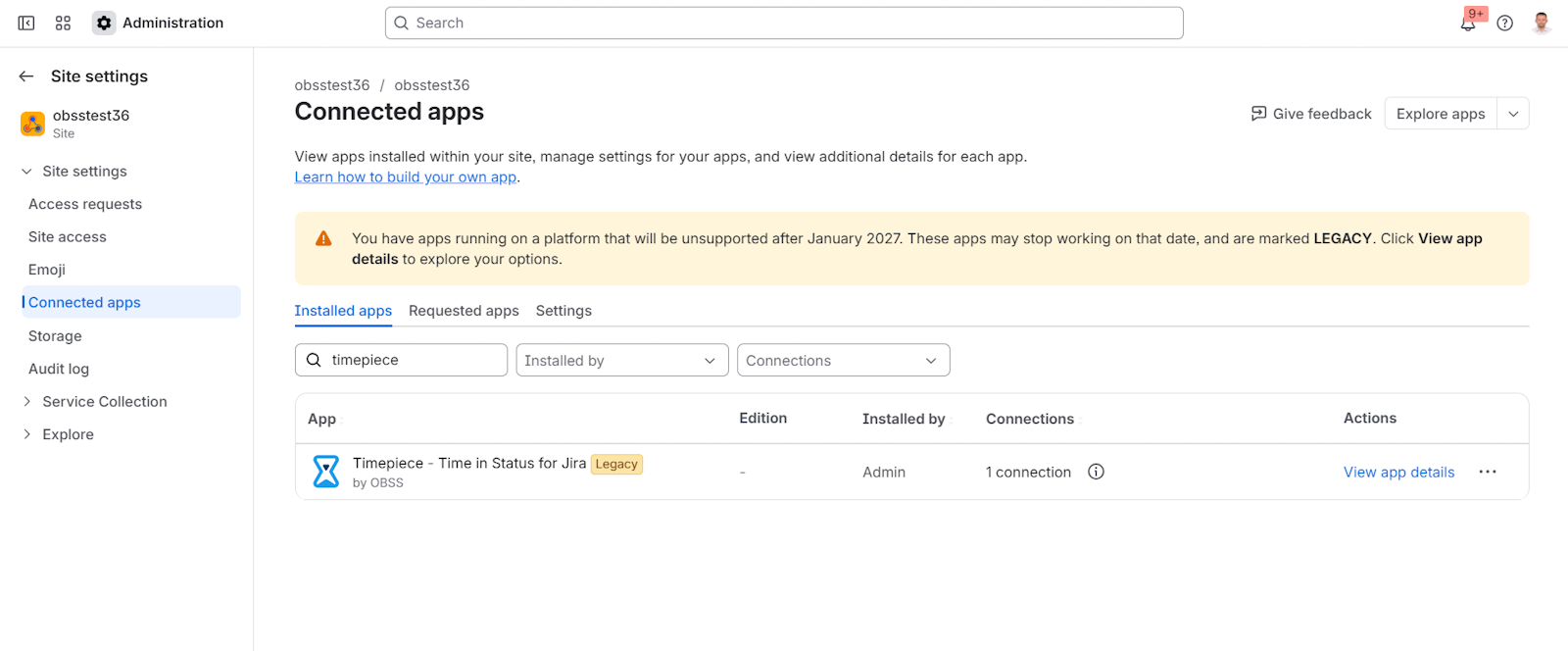
This warning is caused by legacy modules in the app that remain only for backward compatibility and to keep the app running for customers who haven’t migrated to the latest version yet.
What do I need to do?
Usually, marketplace app updates are distributed automatically, but some updates require explicit admin approval. Migration from the legacy Timepiece version to the latest platform is one of those updates that require manual admin action.
If you are not running on the latest version of Timepiece, update the app as early as possible. (Click on the “View app details” link, and on the next page, use the Update button). This update requires no advanced preparation, doesn’t include additional manual steps, and doesn’t cause any Timepiece service interruption. See this blog post for more details.
If you are already using the latest version of Timepiece, you are not using any legacy modules, and you don’t have to take any additional action.
The remaining legacy modules will be removed from the app very soon, and then (for customers using the latest version of the app) the Legacy badge and the warning message will disappear for Timepiece.
Have questions?
Please reach out to our support team if you have questions about this.