
This article describes how to group aggregated Timepiece - Time in Status reports by Jira Roadmaps hierarchy levels, so that averages, sums, medians, or standard deviations can be compared across levels of the hierarchy. The hierarchy levels configured in Jira are offered as Group By fields, and Timepiece resolves each work item's parent at each level automatically. This lets leadership compare delivery performance between initiatives or portfolios instead of reading issue-by-issue data.
Business Need
Let's presume ...
Your Jira work items are organized in a multi-level Roadmaps hierarchy, where work items are linked through parent-child relationships.
You want to analyze average status times by grouping work items based on hierarchy levels, so that metrics can be aggregated and compared across different levels of the hierarchy.
Solution
The Hierarchy Level fields in Timepiece can be used for this purpose.
Timepiece reads the Roadmaps hierarchy levels configured in your Jira and brings them as grouping options to your aggregated report.
When hierarchy levels are used as Group By fields, Timepiece follows the parent/child relations of each work item to find the parent in each level, groups the report data by the selected hierarchy levels, thus allows you to aggregate and compare metrics across different levels of the hierarchy.
This document explains how to group your aggregated reports by hierarchy fields. For information on how to add Hierarchy Levels as Fields to your report, please see How to see Roadmaps Hierarchy parents as columns in Timepiece Reports?
Using Hierarchy Levels as Group By Fields
You should:
-
Open the Timepiece reporting page.
-
Select the projects in which the issues reside (or apply any other filter to define the scope of your report).
-
Switch to the Status Duration report.
-
Click the List button.
-
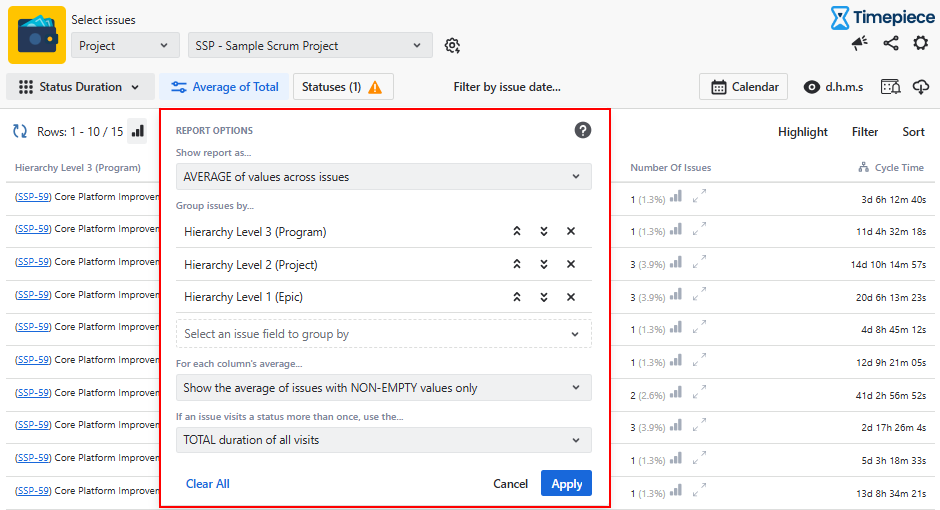
Select the Average option (or any other aggregation type such as Sum, Median, or Standard Deviation).
-
Add hierarchy levels as Group By fields.
-
Click Apply.
-
-
Select the statuses you want to include in the report.
-
Select your business calendar if you have one.
The report will aggregate the data based on the selected hierarchy levels, allowing you to analyze metrics across different levels of the hierarchy.
.png?cb=c4a117c2491a1537bf143b9183f7bc42)